Creating a home office that is both comfortable and productive can significantly improve your work-from-home experience. Whether you’re working remotely full-time or occasionally from home, a well-designed workspace helps maintain focus, reduce stress, and boost efficiency. In this post, we’ll explore practical tips to help you create a home office that suits your needs and enhances your working day.
Choose the Right Location
The first step is selecting the ideal spot for your home office. Ideally, pick a quiet area away from distractions such as household noise or high-traffic zones. A spare room, a corner of the living room, or a section of the bedroom can work well, provided you can separate work from daily life.
Tip: If space is limited, use room dividers or screens to create a sense of separation.
Invest in Ergonomic Furniture
Comfort is key to staying productive. Invest in an ergonomic chair that supports your back and encourages good posture. Your desk should be at a height that fits your body comfortably, allowing your elbows to rest at 90 degrees when typing.
Essential Ergonomic Tips:
– Use a chair with adjustable height and lumbar support.
– Keep feet flat on the floor or on a footrest.
– Position your computer screen at eye level to avoid neck strain.
– Consider an adjustable standing desk for flexibility.
Optimise Lighting
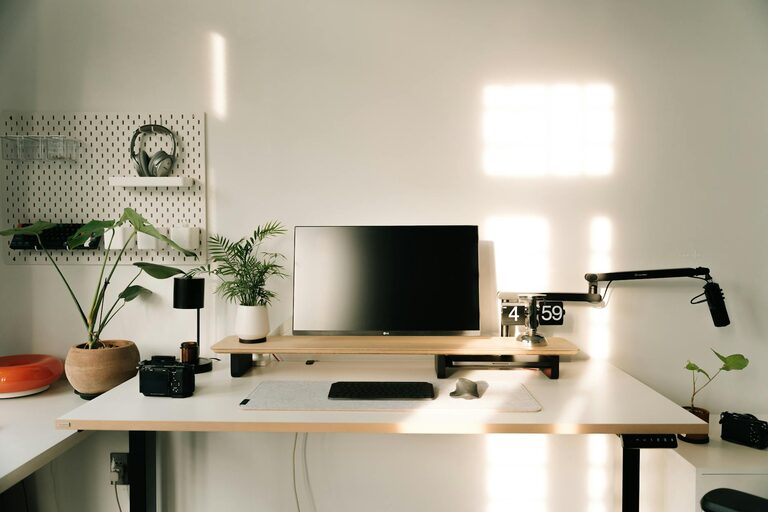
Good lighting reduces eye strain and keeps you alert. Natural light is the best option, so place your desk near a window if possible. If natural light is limited, choose bright, indirect artificial lighting.
Lighting Tips:
– Avoid glare on your screen by having light sources to the side rather than directly in front or behind.
– Use a desk lamp with adjustable brightness.
– Consider daylight bulbs to mimic natural light during darker months.
Keep Your Workspace Organised
An organised workspace helps clear your mind and boosts productivity. Use storage solutions like shelves, filing cabinets, or desk organisers to keep essential items within reach but out of the way.
Organisation Tips:
– Declutter regularly to maintain a tidy area.
– Use cable management tools to prevent tangles and mess.
– Label storage boxes and files for easy access.
Personalise Your Space
Adding personal touches can make your workspace feel welcoming and motivating. Consider artwork, plants, or photographs that inspire you.
Benefits of Personalisation:
– Plants improve air quality and reduce stress.
– Favourite colours can enhance mood and creativity.
– Personal items remind you of your goals and values.
Minimise Distractions
Staying focused at home can be challenging. Set clear boundaries with family or housemates about your working hours. Use noise-cancelling headphones or play background music if it helps concentration.
Additional Suggestions:
– Turn off non-urgent notifications on your devices.
– Use apps that block distracting websites during work hours.
– Establish a routine that signals the start and end of your workday.
Incorporate Technology Wisely
Choose tools and technology that support your work without causing frustration. A reliable computer, fast internet, and quality peripherals like a keyboard and mouse can make a big difference.
Technology Tips:
– Keep software and hardware updated.
– Use cloud storage for easy access and backup.
– Invest in a good headset or microphone for calls.
Take Regular Breaks
Remember to rest your eyes and stretch regularly to prevent fatigue. Following techniques such as the Pomodoro method – working in focused intervals followed by short breaks – can enhance overall productivity.
Quick Break Ideas:
– Stand up and stretch for a few minutes.
– Take a walk around your home or garden.
– Perform simple breathing exercises.
Maintain a Work-Life Balance
To avoid burnout, create a clear distinction between work and personal time. When your workday ends, shut down your computer and tidy your workspace.
Tips for Balance:
– Dress as if you were going to an office to mentally prepare for work.
– Set a fixed finishing time and stick to it.
– Use your workspace exclusively for work to create mental separation.
Final Thoughts
Designing a home office that fits your workflow and comfort needs doesn’t require a big budget or a lot of space. With thoughtful choices about location, furniture, lighting, and organisation, you can develop a productive environment that supports your professional goals and wellbeing.
By applying these tips, your home office can become a place you look forward to working in each day, balancing comfort with efficiency. Happy working!